Integrating Modula Vertical Storage Units with Tulip
Vertical Storage Units (VLMs) are a really nifty piece of equipment in a shop-floor. They can store a huge number of relatively small size SKUs in a small footprint. As such, it’s great for storing machine tooling (which tends to explode in quantity with SKU variation) and spares.
The way they work is really fun to watch too. If you’re able to see the insides – it’s got a retrieval unit going up and down with chains used to pull and push trays. If you follow Starship launches – it looks a lot like the “Pez Dispenser” used by Starship to get the Starlink payload deployed.
Tooling Inventory Discrepancy
Coming back to the tooling, an issue we constantly faced is keeping track of tooling inventory transactions reliably. We had a simple PowerApps tooling checkout system but this was dependent on operators remembering to log the tools in and out, and transaction misses lead to inventory shortages when you need it the most!
If only there was a way to lock out the storage unit until you go through the logging software. Luckily, Modula sells a suite of software related to inventory management. The main one being the Modula WMS, which has a lot of bells and whistles for controlling inventory and to automate retrieval in the Modula. This can be a good choice but you’re tied to the software and can’t add any features (say a feature to look at the tooling drawing before retrieving the tooling).
Another option is the Modula Link – It acts as a communication server which opens a TCP port you can send commands and receive machine status. This opens the door to integrating with external systems – like Tulip.
My Approach
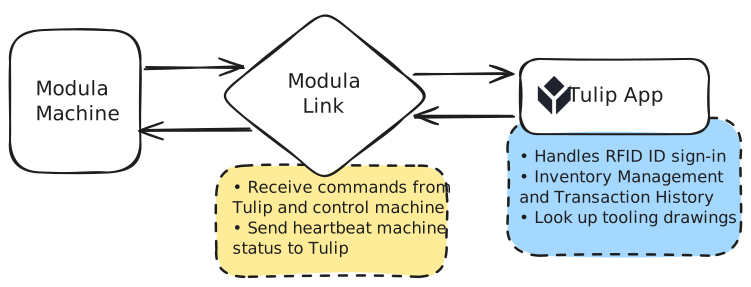
I went with installing Modula Link in an on-prem server and using Node-red on the same server. I chose to add the VLM as a machine in Tulip, as opposed to using an HTTP connector, because it offers some nice built-in features like the status Gantt Chart and Machine Activity Table.
To set this up as a “machine” in Tulip, I used MQTT as the bridge between Node-RED and Tulip. I started a local MQTT broker and had Node-RED publish the VLM’s state to a status topic. On the Tulip side, I pointed it to that broker and define machine attributes on top of it. In my case, a read-only status attribute and a writeable commands attribute.
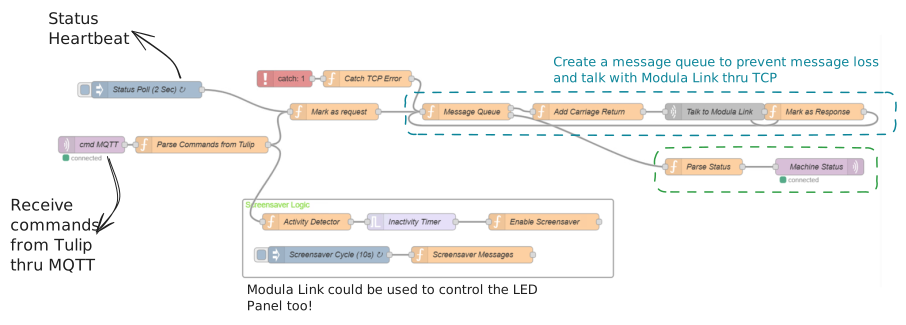
Once the machine is configured, interacting with it from a Tulip app is pretty straightforward. You can use the built-in machine steps to write to the command topic. For something like tray retrieval, the app writes a command (translated by Node-RED into a Modula Link TCP message) and then just waits on the status to confirm that the tray has arrived. It ends up feeling pretty seamless from the operator’s perspective.
One issue I ran into, and this took a while to figure out, was an intermittent error in Tulip that shows up as a yellow “Waiting for communication” box and crashes the app. It didn’t happen consistently, which made it even more annoying to debug (I had to dig through the Tulip browser console to get any real clue).
The root cause turned out to be a circular trigger loop. I had logic where writing to a machine attribute would fire a trigger, which would run an action, which then wrote back to the same attribute again. Most of the time it worked fine, but under even small amounts of latency (Network issues, MQTT delays, etc.), it would get stuck and crash.
Conclusion
Overall, this setup worked out pretty well. It gave us a way to enforce tooling transactions without being locked into a rigid system, and still keep the flexibility to build whatever workflow we wanted on top in Tulip.